

Are you tired of signing into your blog to view and moderate your comments? Everytime a new comment is held in moderation, your WordPress install uses its notification feature to email you and you have to login in your blog to moderate your comments.
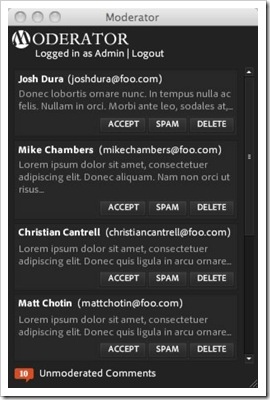
Moderator is an excellent solution to moderate comments from your desktop. It uses combination of WordPress plugin associated with Adobe AIR 1.1, which runs on Mac, Windows, and is currently in beta on Linux.
Some noteable features are,
- Viewing unmoderated comments.
- Dock and system tray notifications of the number of unmoderated comments.
- Accept, delete, and spam comments from within the desktop client.
- Close application window, or minimize it to the system tray while running.
- Shows the Gravatar icons for the user who posted the comment.
Download the current Moderator Plugin Bundle.




sir plz i want earn money by internet. plz help me how to earn simple plz